Appearance
药品订单
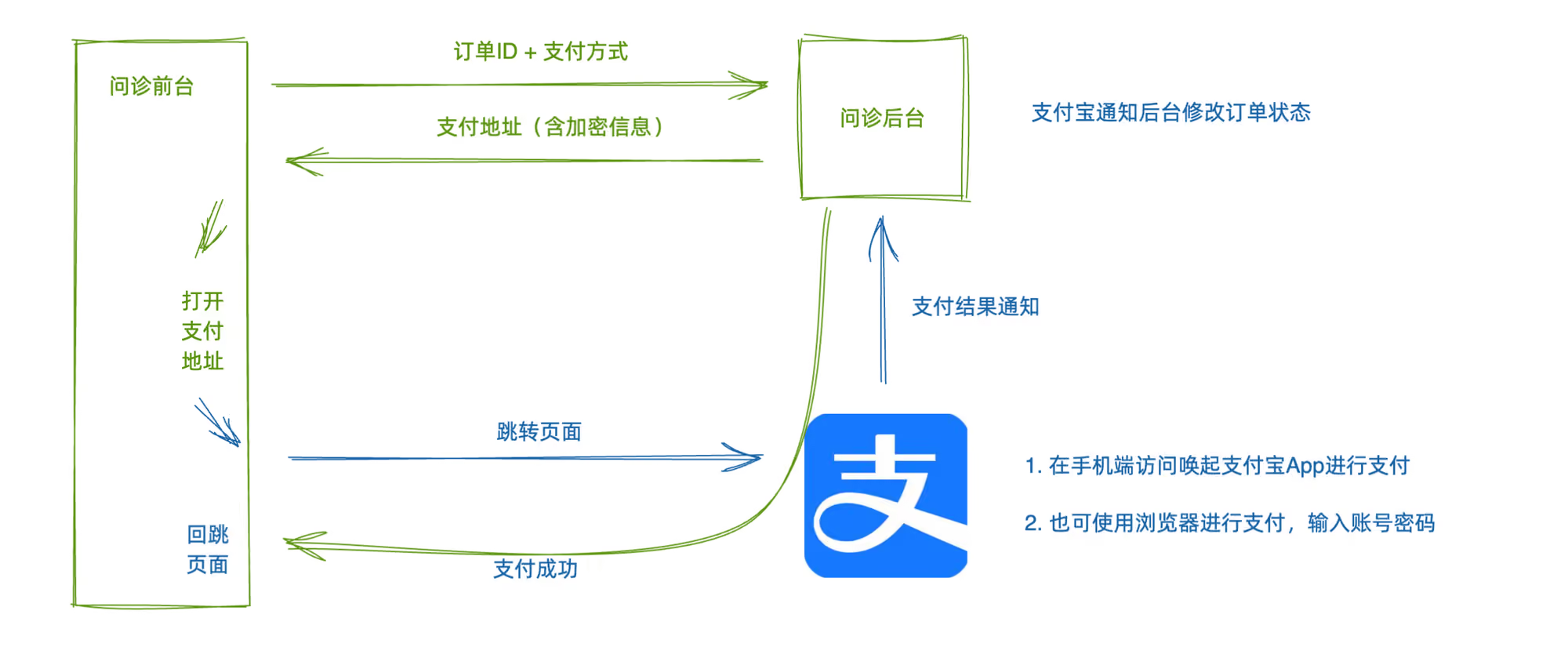
药品订单-支付页面
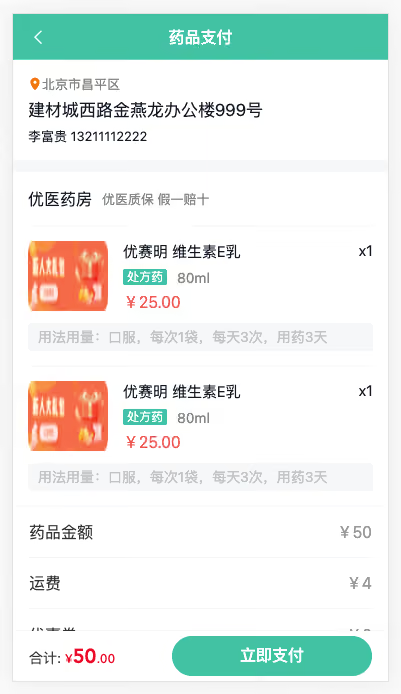
- 处方状态不同此按钮操作不同:
- 如果处方失效:提示即可
- 如果没付款且有订单ID,代表已经生成订单没付款:去订单详情付款
- 如果没付款且没订单ID:去预支付页面
代码:
1)跳转逻辑处理
ts
import { useRouter } from 'vue-router'
import { PrescriptionStatus } from '@/enums'
import { showToast } from 'vant'

// 点击处方的跳转
const router = useRouter()
const buy = (pre?: Prescription) => {
  if (pre) {
    if (pre.status === PrescriptionStatus.Invalid) return showToast('处方已失效')
    if (pre.status === PrescriptionStatus.NotPayment && !pre.orderId) return router.push(`/order/pay?id=${pre.id}`)
    router.push(`/order/${pre.orderId}`)
  }
}按钮事件绑定
html
<div class="foot"><span @click="buy(msg.prescription)">购买药品</span></div>2)路由与组件
ts
    {
      path: '/order/pay',
      component: () => import('@/views/Order/OrderPay.vue'),
      meta: { title: '药品支付' }
},vue
<script setup lang="ts"></script>

<template>
  <div class="order-pay-page">
    <cp-nav-bar title="药品支付" />
    <div class="order-address">
      <p class="area">
        <van-icon name="location" />
        <span>北京市昌平区</span>
      </p>
      <p class="detail">建材城西路金燕龙办公楼999号</p>
      <p>李富贵 13211112222</p>
    </div>
    <div class="order-medical">
      <div class="head">
        <h3>优医药房</h3>
        <small>优医质保 假一赔十</small>
      </div>
      <div class="item van-hairline--top" v-for="i in 2" :key="i">
        <img class="img" src="@/assets/ad.png" alt="" />
        <div class="info">
          <p class="name">
            <span>优赛明 维生素E乳</span>
            <span>x1</span>
          </p>
          <p class="size">
            <van-tag>处方药</van-tag>
            <span>80ml</span>
          </p>
          <p class="price">¥25.00</p>
        </div>
        <div class="desc">用法用量:口服,每次1袋,每天3次,用药3天</div>
      </div>
    </div>
    <div class="order-detail">
      <van-cell-group>
        <van-cell title="药品金额" value="¥50" />
        <van-cell title="运费" value="¥4" />
        <van-cell title="优惠券" value="-¥0" />
        <van-cell title="实付款" value="¥54" class="price" />
      </van-cell-group>
    </div>
    <div class="order-tip">
      <p class="tip">由于药品的特殊性,如非错发、漏发药品的情况,药品一经发出 不得退换,请核对药品信息无误后下单。</p>
      <van-checkbox>
        我已同意
        <a href="javascript:;">支付协议</a>
      </van-checkbox>
    </div>
    <van-submit-bar :price="50 * 100" button-text="立即支付" button-type="primary" text-align="left"></van-submit-bar>
  </div>
</template>

<style lang="scss" scoped>
:deep(.van-nav-bar) {
  background-color: var(--cp-primary);
  .van-nav-bar__arrow,
  .van-nav-bar__title {
    color: #fff;
  }
}
:deep(.van-cell) {
  .van-cell__title {
    font-size: 16px;
  }
  .van-cell__value {
    font-size: 16px;
  }
  &.price {
    .van-cell__value {
      font-size: 18px;
      color: var(--cp-price);
    }
  }
}
:deep(.van-submit-bar) {
  box-shadow: 0 0 2px rgba(0, 0, 0, 0.1);
  .van-button {
    width: 200px;
  }
}
.order-pay-page {
  padding: 46px 0 65px;
}
.order-address {
  padding: 15px 15px 0 15px;
  background-color: #fff;
  font-size: 13px;
  .area {
    color: var(--cp-tag);
    margin-bottom: 5px;
    .van-icon-location {
      color: #ff7702;
      font-size: 14px;
    }
  }
  .detail {
    font-size: 17px;
    margin-bottom: 5px;
  }
  &::after {
    content: '';
    display: block;
    height: 12px;
    background-color: var(--cp-bg);
    margin: 0 -15px;
    margin-top: 15px;
  }
}

.order-medical {
  background-color: #fff;
  padding: 0 15px;
  .head {
    display: flex;
    height: 54px;
    align-items: center;
    > h3 {
      font-size: 16px;
      font-weight: normal;
    }
    > small {
      font-size: 13px;
      color: var(--cp-tag);
      margin-left: 10px;
    }
  }
  .item {
    display: flex;
    flex-wrap: wrap;
    padding: 15px 0;
    .img {
      width: 80px;
      height: 70px;
      border-radius: 2px;
      overflow: hidden;
    }
    .info {
      padding-left: 15px;
      width: 250px;
      .name {
        display: flex;
        font-size: 15px;
        margin-bottom: 5px;
        > span:first-child {
          width: 200px;
        }
        > span:last-child {
          width: 50px;
          text-align: right;
        }
      }
      .size {
        margin-bottom: 5px;
        .van-tag {
          background-color: var(--cp-primary);
          vertical-align: middle;
        }
        span:not(.van-tag) {
          margin-left: 10px;
          color: var(--cp-tag);
          vertical-align: middle;
        }
      }
      .price {
        font-size: 16px;
        color: #eb5757;
      }
    }
    .desc {
      width: 100%;
      background-color: var(--cp-bg);
      border-radius: 4px;
      margin-top: 10px;
      padding: 4px 10px;
      color: var(--cp-tip);
    }
  }
}
.order-tip {
  padding: 0 15px;
  display: flex;
  flex-wrap: wrap;
  justify-content: center;
  margin-top: 10px;
  .tip {
    font-size: 12px;
    color: var(--cp-tag);
    width: 100%;
    &::before {
      content: '*';
      color: var(--cp-price);
      font-size: 14px;
    }
    margin-bottom: 30px;
  }
  .van-checkbox {
    a {
      color: var(--cp-primary);
    }
  }
}
</style>药品订单-药品支付页面
1)药品支付类型 types/order.d.ts
ts
import type { Medical } from './room'

export type OrderPre = {
  /** 处方ID */
  id: string
  /** 优惠券ID */
  couponId: string
  /** 积分抵扣 */
  pointDeduction: number
  /** 优惠券抵扣 */
  couponDeduction: number
  /** 应付款 */
  payment: number
  /** 邮费 */
  expressFee: number
  /** 实付款 */
  actualPayment: number
  /** 药品订单 */
  medicines: Medical[]
}
export type AddressItem = {
  /** 地址ID */
  id: string
  /** 联系方式 */
  mobile: string
  /** 收件人 */
  receiver: string
  /** 省 */
  province: string
  /** 市 */
  city: string
  /** 区 */
  county: string
  /** 详细地址 */
  addressDetail: string
  /** 是否默认地址,0 不是 1 是 */
  isDefault: 0 | 1
}2)API函数 services/order.ts
ts
import type { OrderPre, AddressItem } from '@/types/order'
import { request } from '@/utils/request'

// 查询药品订单预支付信息
export const getMedicalOrderPre = (params: { prescriptionId: string }) =>
  request<OrderPre>('/patient/medicine/order/pre', 'GET', params)

// 获取收货地址列表
export const getAddressList = () => request<AddressItem[]>('/patient/order/address')3)渲染
vue
<script setup lang="ts">
import { getAddressList, getMedicalOrderPre } from '@/services/order'
import type { AddressItem, OrderPre } from '@/types/order'
import { onMounted, ref } from 'vue'
import { useRoute } from 'vue-router'

const route = useRoute()
// 预支付信息
const orderPre = ref<OrderPre>()
const loadOrderPre = async () => {
  const res = await getMedicalOrderPre({
    prescriptionId: route.query.id as string,
  })
  orderPre.value = res.data
}
// 收货地址
const address = ref<AddressItem>()
const loadAddress = async () => {
  const addRes = await getAddressList()
  if (addRes.data.length) {
    const defAddress = addRes.data.find(item => item.isDefault === 0)
    if (defAddress) address.value = defAddress
    else address.value = addRes.data[0]
  }
}
onMounted(async () => {
  loadOrderPre()
  loadAddress()
})
</script>

<template>
  <div class="order-pay-page" v-if="orderPre && address">
    <cp-nav-bar title="药品支付" />
    <div class="order-address">
      <p class="area">
        <van-icon name="location" />
        <span>{{ address.province + address.city + address.county }}</span>
      </p>
      <p class="detail">{{ address.addressDetail }}</p>
      <p>
        {{ address.receiver }}
        {{ address.mobile.replace(/^(\d{3})\d+(\d{4})$/, '\$1****\$2') }}
      </p>
    </div>
    <div class="order-medical">
      <div class="head">
        <h3>优医药房</h3>
        <small>优医质保 假一赔十</small>
      </div>
      <div class="item van-hairline--top" v-for="med in orderPre.medicines" :key="med.id">
        <img class="img" :src="med.avatar" alt="" />
        <div class="info">
          <p class="name">
            <span>{{ med.name }}</span>
            <span>x{{ med.quantity }}</span>
          </p>
          <p class="size">
            <van-tag v-if="med.prescriptionFlag === 1">处方药</van-tag>
            <span>{{ med.specs }}</span>
          </p>
          <p class="price">¥{{ med.amount }}</p>
        </div>
        <div class="desc">{{ med.usageDosag }}</div>
      </div>
    </div>
    <div class="order-detail">
      <van-cell-group>
        <van-cell title="药品金额" :value="`¥${orderPre.payment}`" />
        <van-cell title="运费" :value="`¥${orderPre.expressFee}`" />
        <van-cell title="优惠券" :value="`-¥${orderPre.couponDeduction}`" />
        <van-cell title="实付款" :value="`¥${orderPre.actualPayment}`" class="price" />
      </van-cell-group>
    </div>
    <div class="order-tip">
      <p class="tip">由于药品的特殊性,如非错发、漏发药品的情况,药品一经发出 不得退换,请核对药品信息无误后下单。</p>
      <van-checkbox>
        我已同意
        <a href="javascript:;">支付协议</a>
      </van-checkbox>
    </div>
    <van-submit-bar
      :price="orderPre.actualPayment * 100"
      button-text="立即支付"
      button-type="primary"
      text-align="left"></van-submit-bar>
  </div>
  <div class="order-pay-page" v-else>
    <cp-nav-bar title="药品支付" />
    <van-skeleton title avatar row="2" style="margin-top: 15px" />
    <van-skeleton title row="4" style="margin-top: 50px" />
    <van-skeleton title row="4" style="margin-top: 50px" />
  </div>
</template>药品订单-进行支付
1)生成药品订单API函数
ts
// 创建药品订单
export const createMedicalOrder = (data: { id: string; addressId: string; couponId?: string }) =>
request<{ id: string }>('/patient/medicine/order', 'POST', data)2)支付抽屉支持,设置回跳地址
diff
const props = defineProps<{
  orderId: string
  actualPayment: number
  onClose?: () => void
  show: boolean
+  payCallback: string
}>()diff
// 跳转支付
const pay = async () => {
  if (paymentMethod.value === undefined) showToast('请选择支付方式')
  showLoadingToast({ message: '跳转支付', duration: 0 })
  const res = await getConsultOrderPayUrl({
    orderId: props.orderId,
    paymentMethod: paymentMethod.value,
+    payCallback: 'http://localhost:5173' + props.payCallback
  })
  window.location.href = res.data.payUrl
}- 生成订单,使用支付抽屉组件
ts
import { createMedicalOrder } from '@/services/order'ts
// 生成订单
const agree = ref(false)
const loading = ref(false)
const orderId = ref('')
const submit = async () => {
  if (!agree.value) return showToast('请同意支付协议')
  if (!address.value?.id) return showToast('请选择收货地址')
  if (!orderPre.value?.id) return showToast('未找到处方')
  // 没有生成订单ID
  if (!orderId.value) {
    try {
      loading.value = true
      const res = await createMedicalOrder({
        id: orderPre.value?.id,
        addressId: address.value?.id,
        couponId: orderPre.value.couponId,
      })
      orderId.value = res.data.id
      loading.value = false
      // 打开支付抽屉
      show.value = true
    } catch (e) {
      loading.value = false
    }
  } else {
    show.value = true
  }
}
// 控制抽屉和弹窗
const show = ref(false)html
<cp-pay-sheet
  v-model:show="show"
  :orderId="orderId"
  :actualPayment="orderPre.actualPayment"
payCallback="/order/pay/result" />药品订单-支付结果
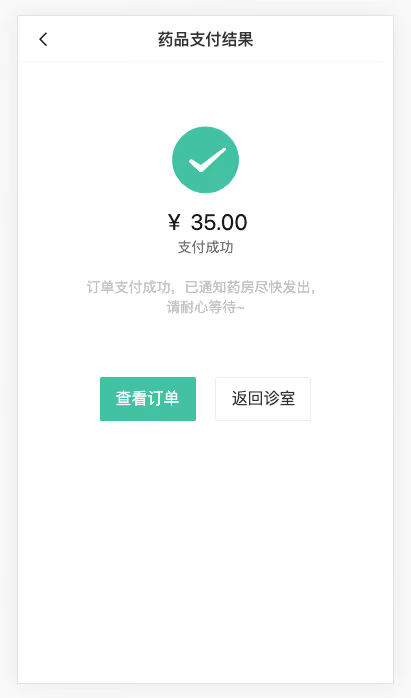
1)路由与组件
ts
    {
      path: '/order/pay/result',
      component: () => import('@/views/Order/OrderPayResult.vue'),
      meta: { title: '药品支付结果' }
}vue
<script setup lang="ts"></script>

<template>
  <div class="order-pay-result-page">
    <cp-nav-bar title="药品支付结果" />
    <div class="result">
      <van-icon name="clear" />
      <p class="price">¥ 100.00</p>
      <p class="status">支付失败</p>
      <p class="tip">订单支付失败,可以点击查看订单继续支付,如有疑问联系客服~</p>
    </div>
    <div class="result">
      <van-icon name="checked" />
      <p class="price">¥ 100.00</p>
      <p class="status">支付成功</p>
      <p class="tip">订单支付成功,已通知药房尽快发出, 请耐心等待~</p>
    </div>
    <div class="btn">
      <van-button type="primary" :to="`/order/10000`">查看订单</van-button>
      <van-button :to="`/room?orderId=10000`">返回诊室</van-button>
    </div>
  </div>
</template>

<style lang="scss" scoped>
.order-pay-result-page {
  padding-top: 46px;
  .result {
    display: flex;
    flex-direction: column;
    align-items: center;
    .van-icon {
      font-size: 75px;
      margin-top: 60px;
    }
    .van-icon-clear {
      color: var(--cp-price);
    }
    .van-icon-checked {
      color: var(--cp-primary);
    }
    .price {
      font-size: 22px;
      margin-top: 10px;
    }
    .status {
      color: var(--cp-text3);
    }
    .tip {
      color: var(--cp-tip);
      width: 240px;
      text-align: center;
      margin-top: 20px;
    }
  }
  .btn {
    margin-top: 60px;
    display: flex;
    justify-content: center;
    .van-button--primary {
      margin-right: 20px;
    }
  }
}
</style>2)展示信息
ts
type Address = Omit<AddressItem, 'isDefault'>

export type OrderDetail = {
  /** 药品订单ID */
  id: string
  /** 药品订单编号 */
  orderNo: string
  /** 订单类型 */
  type: number
  /** 创建时间 */
  createTime: string
  /** 处方ID */
  prescriptionId: string
  /** 订单状态 */
  status: OrderType
  /** 订单状态说明 */
  statusValue: string
  /** 药品清单 */
  medicines: Medical[]
  /** 支付倒计时时间 */
  countDown: number
  /** 收货地址 */
  addressInfo: Address
  /** 物流信息 */
  expressInfo: {
    /** 物流最新位置 */
    content: string
    /** 物流最新时间 */
    time: string
  }
  /** 支付时间 */
  payTime: string
  /** 支付方式 */
  paymentMethod?: 0 | 1
  /** 支付金额 */
  payment: number
  /** 积分抵扣 */
  pointDeduction: number
  /** 优惠券抵扣 */
  couponDeduction: number
  /** 邮费 */
  expressFee: number
  /** 实付金额 */
  actualPayment: number
  /** 问诊室ID */
  roomId: string
}ts
// 获取药品订单详情
export const getMedicalOrderDetail = (id: string) => request<OrderDetail>(`/patient/medicine/order/detail/${id}`)vue
<script setup lang="ts">
import { OrderType } from '@/enums'
import { getMedicalOrderDetail } from '@/services/order'
import type { OrderDetail } from '@/types/order'
import { onMounted, ref } from 'vue'
import { useRoute } from 'vue-router'

const order = ref<OrderDetail>()
const route = useRoute()
onMounted(async () => {
  const res = await getMedicalOrderDetail(route.query.orderId as string)
  order.value = res.data
})
</script>

<template>
  <div class="order-pay-result-page">
    <cp-nav-bar title="药品支付结果" />
    <div class="result" v-if="order?.status === OrderType.MedicinePay">
      <van-icon name="clear" />
      <p class="price">¥ {{ order?.actualPayment }}</p>
      <p class="status">支付失败</p>
      <p class="tip">订单支付失败,可以点击查看订单继续支付,如有疑问联系客服~</p>
    </div>
    <div class="result" v-else>
      <van-icon name="checked" />
      <p class="price">¥ {{ order?.actualPayment }}</p>
      <p class="status">支付成功</p>
      <p class="tip">订单支付成功,已通知药房尽快发出, 请耐心等待~</p>
    </div>
    <div class="btn">
      <van-button type="primary" :to="`/order/${order?.id}`">查看订单</van-button>
      <van-button :to="`/room?orderId=${order?.roomId}`">返回诊室</van-button>
    </div>
  </div>
</template>药品订单-订单详情
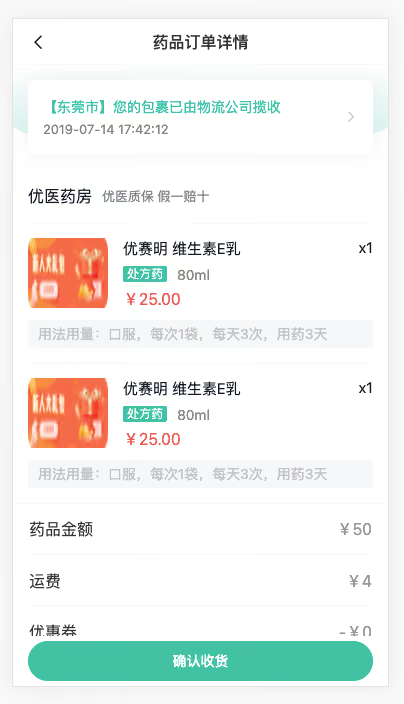
1)路由与组件
ts
    {
      path: '/order/:id',
      component: () => import('@/views/Order/OrderDetail.vue'),
      meta: { title: '药品订单详情' }
}vue
<script setup lang="ts"></script>

<template>
  <div class="order-detail-page">
    <cp-nav-bar title="药品订单详情" />
    <div class="order-head">
      <!-- <div class="address">
        <p class="area">
          <van-icon name="location" />
          <span>北京市昌平区</span>
        </p>
        <p class="detail">建材城西路金燕龙办公楼999号</p>
        <p>李富贵 13211112222</p>
      </div> -->
      <div class="card">
        <div class="logistics">
          <p>【东莞市】您的包裹已由物流公司揽收</p>
          <p>2019-07-14 17:42:12</p>
        </div>
        <van-icon name="arrow" />
      </div>
    </div>
    <div class="order-medical">
      <div class="head">
        <h3>优医药房</h3>
        <small>优医质保 假一赔十</small>
      </div>
      <div class="item van-hairline--top" v-for="i in 2" :key="i">
        <img class="img" src="@/assets/ad.png" alt="" />
        <div class="info">
          <p class="name">
            <span>优赛明 维生素E乳</span>
            <span>x1</span>
          </p>
          <p class="size">
            <van-tag>处方药</van-tag>
            <span>80ml</span>
          </p>
          <p class="price">¥25.00</p>
        </div>
        <div class="desc">用法用量:口服,每次1袋,每天3次,用药3天</div>
      </div>
    </div>
    <div class="order-detail">
      <van-cell-group>
        <van-cell title="药品金额" value="¥50.00" />
        <van-cell title="运费" value="¥4.00" />
        <van-cell title="优惠券" value="-¥0.00" />
        <van-cell title="实付款" value="¥54.00" class="price" />
        <van-cell title="订单编号" value="202201127465" />
        <van-cell title="创建时间" value="2022-01-23 09:23:46" />
        <van-cell title="支付时间" value="2022-01-23 09:23:46" />
        <van-cell title="支付方式" value="支付宝支付" />
      </van-cell-group>
    </div>
    <!-- 已取消 -->
    <!-- <van-action-bar>
      <van-action-bar-icon icon="delete-o" text="删除" />
      <van-action-bar-button type="primary" text="沟通记录" />
    </van-action-bar> -->
    <!-- 待收货 -->
    <van-action-bar>
      <van-action-bar-button type="primary" text="确认收货" />
    </van-action-bar>
    <!-- 待发货 -->
    <!-- <van-action-bar>
      <van-action-bar-button type="primary" text="提醒发货" />
    </van-action-bar> -->
    <!-- 待支付 -->
    <!-- <van-action-bar>
      <p class="price">需要支付:<span>¥60</span></p>
      <van-action-bar-button color="#bbb" text="取消订单" />
      <van-action-bar-button type="primary" text="继续支付" />
    </van-action-bar> -->
    <!-- 已完成 -->
    <!-- <van-action-bar>
      <van-action-bar-icon icon="delete-o" text="删除" />
      <van-action-bar-button type="primary" text="再次购买" />
    </van-action-bar> -->
  </div>
</template>

<style lang="scss" scoped>
.order-detail-page {
  padding-top: 46px;
  padding-bottom: 65px;
}
.address {
  padding: 15px;
  background-color: #fff;
  font-size: 13px;
  position: relative;
  box-shadow: 0px 0px 22px 0px rgba(229, 229, 229, 0.5);
  border-radius: 8px;
  .area {
    color: var(--cp-tag);
    margin-bottom: 5px;
    .van-icon-location {
      color: #ff7702;
      font-size: 14px;
    }
  }
  .detail {
    font-size: 17px;
    margin-bottom: 5px;
  }
}
.order-head {
  position: relative;
  padding: 15px;
  &::before {
    content: '';
    position: absolute;
    left: 0;
    top: 0;
    width: 100%;
    height: 80px;
    background: linear-gradient(180deg, rgba(44, 181, 165, 0), rgba(44, 181, 165, 0.2));
    border-bottom-left-radius: 150px 20px;
    border-bottom-right-radius: 150px 20px;
  }
  .card {
    height: 74px;
    background-color: #fff;
    border-radius: 8px;
    position: relative;
    display: flex;
    align-items: center;
    padding: 0 15px;
    box-shadow: 0px 0px 22px 0px rgba(229, 229, 229, 0.5);
    .logistics {
      flex: 1;
      p {
        &:first-child {
          color: var(--cp-primary);
        }
        &:last-child {
          color: var(--cp-tag);
          font-size: 13px;
          margin-top: 5px;
        }
      }
    }
    .van-icon {
      color: var(--cp-tip);
    }
  }
}
:deep(.van-cell) {
  .van-cell__title {
    font-size: 14px;
    flex: none;
    width: 100px;
  }
  .van-cell__value {
    font-size: 14px;
  }
  &.price {
    .van-cell__value {
      font-size: 18px;
      color: var(--cp-price);
    }
  }
}
.order-medical {
  background-color: #fff;
  padding: 0 15px;
  .head {
    display: flex;
    height: 54px;
    align-items: center;
    > h3 {
      font-size: 16px;
      font-weight: normal;
    }
    > small {
      font-size: 13px;
      color: var(--cp-tag);
      margin-left: 10px;
    }
  }
  .item {
    display: flex;
    flex-wrap: wrap;
    padding: 15px 0;
    .img {
      width: 80px;
      height: 70px;
      border-radius: 2px;
      overflow: hidden;
    }
    .info {
      padding-left: 15px;
      width: 250px;
      .name {
        display: flex;
        font-size: 15px;
        margin-bottom: 5px;
        > span:first-child {
          width: 200px;
        }
        > span:last-child {
          width: 50px;
          text-align: right;
        }
      }
      .size {
        margin-bottom: 5px;
        .van-tag {
          background-color: var(--cp-primary);
          vertical-align: middle;
        }
        span:not(.van-tag) {
          margin-left: 10px;
          color: var(--cp-tag);
          vertical-align: middle;
        }
      }
      .price {
        font-size: 16px;
        color: #eb5757;
      }
    }
    .desc {
      width: 100%;
      background-color: var(--cp-bg);
      border-radius: 4px;
      margin-top: 10px;
      padding: 4px 10px;
      color: var(--cp-tip);
    }
  }
}
.van-action-bar {
  padding: 0 10px;
  box-shadow: 0 0 2px rgba(0, 0, 0, 0.1);
  .price {
    padding: 0 10px;
    > span {
      font-size: 18px;
      color: var(--cp-price);
    }
  }
}
</style>2)抽取药品组件
vue
<script setup lang="ts">
import type { Medical } from '@/types/room'

const { medicines = [] } = defineProps<{ medicines?: Medical[] }>()
</script>

<template>
  <div class="order-medical">
    <div class="head">
      <h3>优医药房</h3>
      <small>优医质保 假一赔十</small>
    </div>
    <div class="item van-hairline--top" v-for="med in medicines" :key="med.id">
      <img class="img" :src="med.avatar" alt="" />
      <div class="info">
        <p class="name">
          <span>{{ med.name }}</span>
          <span>x{{ med.quantity }}</span>
        </p>
        <p class="size">
          <van-tag v-if="med.prescriptionFlag === 1">处方药</van-tag>
          <span>{{ med.specs }}</span>
        </p>
        <p class="price">¥{{ med.amount }}</p>
      </div>
      <div class="desc" v-if="med.usageDosag">{{ med.usageDosag }}</div>
    </div>
  </div>
</template>

<style lang="scss" scoped>
.order-medical {
  background-color: #fff;
  padding: 0 15px;
  .head {
    display: flex;
    height: 54px;
    align-items: center;
    > h3 {
      font-size: 16px;
      font-weight: normal;
    }
    > small {
      font-size: 13px;
      color: var(--cp-tag);
      margin-left: 10px;
    }
  }
  .item {
    display: flex;
    flex-wrap: wrap;
    padding: 15px 0;
    .img {
      width: 80px;
      height: 70px;
      border-radius: 2px;
      overflow: hidden;
    }
    .info {
      padding-left: 15px;
      width: 250px;
      .name {
        display: flex;
        font-size: 15px;
        margin-bottom: 5px;
        > span:first-child {
          width: 200px;
        }
        > span:last-child {
          width: 50px;
          text-align: right;
        }
      }
      .size {
        margin-bottom: 5px;
        .van-tag {
          background-color: var(--cp-primary);
          vertical-align: middle;
        }
        span:not(.van-tag) {
          margin-left: 10px;
          color: var(--cp-tag);
          vertical-align: middle;
        }
      }
      .price {
        font-size: 16px;
        color: #eb5757;
      }
    }
    .desc {
      width: 100%;
      background-color: var(--cp-bg);
      border-radius: 4px;
      margin-top: 10px;
      padding: 4px 10px;
      color: var(--cp-tip);
    }
  }
}
</style>3)获取订单详情数据composable封装
ts
import { getMedicalOrderDetail } from '@/services/order'
import type { OrderDetail } from '@/types/order'
import { onMounted, ref } from 'vue'

export const useOrderDetail = (id: string) => {
  const loading = ref(false)
  const order = ref<OrderDetail>()
  onMounted(async () => {
    loading.value = true
    try {
      const res = await getMedicalOrderDetail(id)
      order.value = res.data
    } finally {
      loading.value = false
    }
  })
  return { order, loading }
}4)获取信息且渲染
vue
<script setup lang="ts">
import { useOrderDetail } from '@/composables'
import { OrderType } from '@/enums'
import { useRoute } from 'vue-router'
import OrderMedical from './components/OrderMedical.vue'

const route = useRoute()
const { order } = useOrderDetail(route.params.id as string)
</script>

<template>
  <div class="order-detail-page" v-if="order">
    <cp-nav-bar :title="'药品订单-' + order.statusValue" />
    <div class="order-head">
      <div
        class="address"
        v-if="
          order.status === OrderType.MedicineCancel ||
          order.status === OrderType.MedicinePay ||
          order.status === OrderType.MedicineSend
        ">
        <p class="area">
          <van-icon name="location" />
          <span>{{ order.addressInfo.province + order.addressInfo.city + order.addressInfo.county }}</span>
        </p>
        <p class="detail">{{ order.addressInfo.addressDetail }}</p>
        <p>
          {{ order.addressInfo.receiver }}
          {{ order.addressInfo.mobile.replace(/^(\d{3})\d+(\d{4})$/, '$1****$2') }}
        </p>
      </div>
      <div class="card" v-else @click="$router.push(`/order/logistics/${order?.id}`)">
        <div class="logistics">
          <p>{{ order.expressInfo.content }}</p>
          <p>{{ order.expressInfo.time }}</p>
        </div>
        <van-icon name="arrow" />
      </div>
    </div>
    <order-medical :medicines="order?.medicines" />
    <div class="order-detail">
      <van-cell-group>
        <van-cell title="药品金额" :value="`¥${order.payment}`" />
        <van-cell title="运费" :value="`¥${order.expressFee}`" />
        <van-cell title="优惠券" :value="`-¥${order.couponDeduction}`" />
        <van-cell title="实付款" :value="`¥${order.actualPayment}`" class="price" />
        <van-cell title="订单编号" :value="order.orderNo" />
        <van-cell title="创建时间" :value="order.createTime" />
        <template
          v-if="
            order.status === OrderType.MedicineSend ||
            order.status === OrderType.MedicineTake ||
            order.status === OrderType.MedicineComplete
          ">
          <van-cell title="支付时间" :value="order.payTime" />
          <van-cell title="支付方式" :value="order.paymentMethod === 0 ? '微信' : '支付宝'" />
        </template>
      </van-cell-group>
    </div>
    <!-- 已取消 -->
    <van-action-bar v-if="order.status === OrderType.MedicineCancel">
      <van-action-bar-icon icon="delete-o" text="删除" />
      <van-action-bar-button type="primary" text="沟通记录" />
    </van-action-bar>
    <!-- 待收货 -->
    <van-action-bar v-if="order.status === OrderType.MedicineTake">
      <van-action-bar-button type="primary" text="确认收货" />
    </van-action-bar>
    <!-- 待发货 -->
    <van-action-bar v-if="order.status === OrderType.MedicineSend">
      <van-action-bar-button type="primary" text="提醒发货" />
    </van-action-bar>
    <!-- 待支付 -->
    <van-action-bar v-if="order.status === OrderType.MedicinePay">
      <p class="price">
        需要支付:
        <span>¥ {{ order.actualPayment }}</span>
      </p>
      <van-action-bar-button color="#bbb" text="取消问诊" />
      <van-action-bar-button type="primary" text="继续支付" />
    </van-action-bar>
    <!-- 已完成 -->
    <van-action-bar v-if="order.status === OrderType.MedicineComplete">
      <van-action-bar-icon icon="delete-o" text="删除" />
      <van-action-bar-button type="primary" text="再次购买" />
    </van-action-bar>
  </div>
</template>

<style lang="scss" scoped>
.order-detail-page {
  padding-top: 46px;
  padding-bottom: 65px;
}

.address {
  padding: 15px;
  background-color: #fff;
  font-size: 13px;
  position: relative;
  box-shadow: 0px 0px 22px 0px rgba(229, 229, 229, 0.5);
  border-radius: 8px;
  .area {
    color: var(--cp-tag);
    margin-bottom: 5px;
    .van-icon-location {
      color: #ff7702;
      font-size: 14px;
    }
  }
  .detail {
    font-size: 17px;
    margin-bottom: 5px;
  }
}
.order-head {
  position: relative;
  padding: 15px;
  &::before {
    content: '';
    position: absolute;
    left: 0;
    top: 0;
    width: 100%;
    height: 80px;
    background: linear-gradient(180deg, rgba(44, 181, 165, 0), rgba(44, 181, 165, 0.2));
    border-bottom-left-radius: 150px 20px;
    border-bottom-right-radius: 150px 20px;
  }
  .card {
    height: 74px;
    background-color: #fff;
    border-radius: 8px;
    position: relative;
    display: flex;
    align-items: center;
    padding: 0 15px;
    box-shadow: 0px 0px 22px 0px rgba(229, 229, 229, 0.5);
    .logistics {
      flex: 1;
      p {
        &:first-child {
          color: var(--cp-primary);
        }
        &:last-child {
          color: var(--cp-tag);
          font-size: 13px;
          margin-top: 5px;
        }
      }
    }
    .van-icon {
      color: var(--cp-tip);
    }
  }
}
:deep(.van-cell) {
  .van-cell__title {
    font-size: 14px;
    flex: none;
    width: 100px;
  }
  .van-cell__value {
    font-size: 14px;
  }
  &.price {
    .van-cell__value {
      font-size: 18px;
      color: var(--cp-price);
    }
  }
}
.order-medical {
  background-color: #fff;
  padding: 0 15px;
  .head {
    display: flex;
    height: 54px;
    align-items: center;
    > h3 {
      font-size: 16px;
      font-weight: normal;
    }
    > small {
      font-size: 13px;
      color: var(--cp-tag);
      margin-left: 10px;
    }
  }
  .item {
    display: flex;
    flex-wrap: wrap;
    padding: 15px 0;
    .img {
      width: 80px;
      height: 70px;
      border-radius: 2px;
      overflow: hidden;
    }
    .info {
      padding-left: 15px;
      width: 250px;
      .name {
        display: flex;
        font-size: 15px;
        margin-bottom: 5px;
        > span:first-child {
          width: 200px;
        }
        > span:last-child {
          width: 50px;
          text-align: right;
        }
      }
      .size {
        margin-bottom: 5px;
        .van-tag {
          background-color: var(--cp-primary);
          vertical-align: middle;
        }
        span:not(.van-tag) {
          margin-left: 10px;
          color: var(--cp-tag);
          vertical-align: middle;
        }
      }
      .price {
        font-size: 16px;
        color: #eb5757;
      }
    }
    .desc {
      width: 100%;
      background-color: var(--cp-bg);
      border-radius: 4px;
      margin-top: 10px;
      padding: 4px 10px;
      color: var(--cp-tip);
    }
  }
}
.van-action-bar {
  padding: 0 10px;
  box-shadow: 0 0 2px rgba(0, 0, 0, 0.1);
  .price {
    padding: 0 10px;
    > span {
      font-size: 18px;
      color: var(--cp-price);
    }
  }
}
</style>药品订单-物流详情
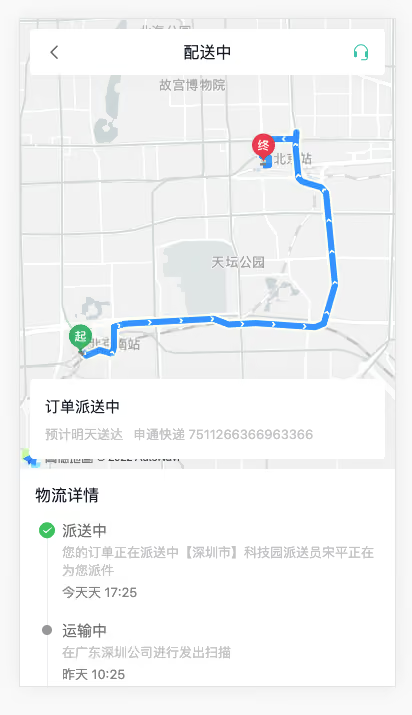
1)路由与组件
ts
    {
      path: '/order/logistics/:id',
      component: () => import('@/views/Order/OrderLogistics.vue'),
      meta: { title: '物流详情' }
}vue
<script setup lang="ts"></script>

<template>
  <div class="order-logistics-page">
    <div id="map">
      <div class="title">
        <van-icon name="arrow-left" @click="$router.back()" />
        <span>配送中</span>
        <van-icon name="service" />
      </div>
      <div class="current">
        <p class="status">订单派送中 预计明天送达</p>
        <p class="predict">
          <span>申通快递</span>
          <span>7511266366963366</span>
        </p>
      </div>
    </div>
    <div class="logistics">
      <p class="title">物流详情</p>
      <van-steps direction="vertical" :active="0">
        <van-step>
          <p class="status">派送中</p>
          <p class="content">您的订单正在派送中【深圳市】科技园派送员宋平正在为您派件</p>
          <p class="time">今天天 17:25</p>
        </van-step>
        <van-step v-for="i in 5" :key="i">
          <p class="status">运输中</p>
          <p class="content">在广东深圳公司进行发出扫描</p>
          <p class="time">昨天 10:25</p>
        </van-step>
        <van-step>
          <p class="status">已发货</p>
          <p class="content">卖家已发货</p>
          <p class="time">2022-08-20 10:25</p>
        </van-step>
      </van-steps>
    </div>
  </div>
</template>

<style lang="scss" scoped>
.order-logistics-page {
  --van-step-icon-size: 18px;
  --van-step-circle-size: 10px;
}
#map {
  height: 450px;
  background-color: var(--cp-bg);
  overflow: hidden;
  position: relative;
  .title {
    background-color: #fff;
    height: 46px;
    width: 355px;
    border-radius: 4px;
    display: flex;
    align-items: center;
    padding: 0 15px;
    font-size: 16px;
    position: absolute;
    left: 10px;
    top: 10px;
    box-sizing: border-box;
    box-shadow: 0px 0px 22px 0px rgba(229, 229, 229, 0.5);
    z-index: 999;
    > span {
      flex: 1;
      text-align: center;
    }
    .van-icon {
      font-size: 18px;
      color: #666;
      &:last-child {
        color: var(--cp-primary);
      }
    }
  }
  .current {
    height: 80px;
    border-radius: 4px;
    background-color: #fff;
    height: 80px;
    width: 355px;
    box-sizing: border-box;
    padding: 15px;
    position: absolute;
    left: 10px;
    bottom: 10px;
    box-shadow: 0px 0px 22px 0px rgba(229, 229, 229, 0.5);
    z-index: 999;
    .status {
      font-size: 15px;
      line-height: 26px;
    }
    .predict {
      color: var(--cp-tip);
      font-size: 13px;
      margin-top: 5px;
      > span {
        padding-right: 10px;
      }
    }
  }
}
.logistics {
  padding: 0 10px 20px;
  .title {
    font-size: 16px;
    padding: 15px 5px 5px;
  }
  .van-steps {
    :deep(.van-step) {
      &::after {
        display: none;
      }
    }
    .status {
      font-size: 15px;
      color: var(--cp-text3);
      margin-bottom: 4px;
    }
    .content {
      font-size: 13px;
      color: var(--cp-tip);
      margin-bottom: 4px;
    }
    .time {
      font-size: 13px;
      color: var(--cp-tag);
    }
  }
}
</style>2)相关类型声明
enums/index.ts
ts
export enum ExpressStatus {
  /** 已发货 */
  Delivered = 1,
  /** 已揽件 */
  Received = 2,
  /** 运输中 */
  Transit = 3,
  /** 派送中 */
  Delivery = 4,
  /** 已签收 */
  Signed = 5,
}types/order.d.ts
ts
export type Express = {
  /** 物流信息ID */
  id: string
  /** 物流内容 */
  content: string
  /** 创建时间 */
  createTime: string
  /** 物流状态 */
  status: ExpressStatus
  /** 状态文章 */
  statusValue: string
}

export type Location = {
  /** 经度 */
  longitude: string
  /** 纬度 */
  latitude: string
}

export type Logistics = {
  /** 预计送达时间 */
  estimatedTime: string
  /** 物流公司名称 */
  name: string
  /** 物流编号 */
  awbNo: string
  /** 最新物流状态 */
  status: ExpressStatus
  /** 最新物流状态文字 */
  statusValue: string
  /** 物流信息数组 */
  list: Express[]
  /** 轨迹信息数组 */
  logisticsInfo: Location[]
  /** 当前运输位置 */
  currentLocationInfo: Location
}3)获取物流详情API函数 services/order.ts
ts
// 获取药品订单物流信息
export const getMedicalOrderLogistics = (id: string) => request<Logistics>(`/patient/order/${id}/logistics`)4)获取数据且渲染
vue
<script setup lang="ts">
import { getMedicalOrderLogistics } from '@/services/order'
import type { Logistics } from '@/types/order'
import { onMounted, ref } from 'vue'
import { useRoute } from 'vue-router'

// 获取物流信息
const logistics = ref<Logistics>()
const route = useRoute()
onMounted(async () => {
  const res = await getMedicalOrderLogistics(route.params.id as string)
  logistics.value = res.data
})
</script>

<template>
  <div class="order-logistics-page">
    <div id="map">
      <div class="title">
        <van-icon name="arrow-left" @click="$router.back()" />
        <span>{{ logistics?.statusValue }}</span>
        <van-icon name="service" />
      </div>
      <div class="current">
        <p class="status">{{ logistics?.statusValue }} 预计{{ logistics?.estimatedTime }}送达</p>
        <p class="predict">
          <span>{{ logistics?.name }}</span>
          <span>{{ logistics?.awbNo }}</span>
        </p>
      </div>
    </div>
    <div class="logistics">
      <p class="title">物流详情</p>
      <van-steps direction="vertical" :active="0">
        <van-step v-for="item in logistics?.list" :key="item.id">
          <p class="status">{{ item.statusValue }}</p>
          <p class="content">{{ item.content }}</p>
          <p class="time">{{ item.createTime }}</p>
        </van-step>
      </van-steps>
    </div>
  </div>
</template>药品订单-高德地图-初始化
参考文档
步骤:
- 准备工作 https://lbs.amap.com/api/jsapi-v2/guide/abc/prepare
- Vue中使用 https://lbs.amap.com/api/jsapi-v2/guide/webcli/map-vue1
代码:
注册&认证完毕===>创建web应用====>得到
key和jscodekey4eed3d61125c8b9c168fc22414aaef7ejscode415e917da833efcf2d5b69f4d821784b
在vue3中使用
a. 安装
bash
pnpm add @amap/amap-jsapi-loaderb. 配置 securityJsCode
ts
window._AMapSecurityConfig = {
  securityJsCode: '415e917da833efcf2d5b69f4d821784b',
}c. 扩展 Window 的类型 types/global.d.ts
ts
interface Window {
  _AMapSecurityConfig: {
    securityJsCode: string
  }
}d. 加载高德地图需要的资源,组件初始化的时候
ts
import AMapLoader from '@amap/amap-jsapi-loader'ts
onMounted(async () => {
  // ... 省略 ...
  AMapLoader.load({
    key: '4eed3d61125c8b9c168fc22414aaef7e',
    version: '2.0',
  }).then(AMap => {
    // 使用 Amap 初始化地图
  })
})ts
const map = new AMap.Map('map', {
  mapStyle: 'amap://styles/whitesmoke',
  zoom: 12,
})药品订单-高德地图-物流轨迹
步骤:
- 绘制轨迹
- 关闭默认覆盖物
- 绘制位置
代码:
1)绘制路径 map 绘制到哪个地图上,showTraffic 是否先道路情况 参考示例 2)关闭 marker 标记,自定义 marker 标记 参考文档
ts
AMap.plugin('AMap.Driving', function () {
  const driving = new AMap.Driving({
    map: map,
    showTraffic: false,
    hideMarkers: true,
  })

  if (logistics.value?.logisticsInfo && logistics.value.logisticsInfo.length >= 2) {
    const list = [...logistics.value.logisticsInfo]
    // 起点
    const start = list.shift()
    // 终点
    const end = list.pop()
    driving.search(
      [start?.longitude, start?.latitude],
      [end?.longitude, end?.latitude],
      { waypoints: list.map(item => [item.longitude, item.latitude]) },
      () => {
        // 规划完毕
      },
    )
  }
})药品订单-高德地图-绘制标记
ts
if (logistics.value?.logisticsInfo && logistics.value.logisticsInfo.length >= 2) {
  const list = [...logistics.value.logisticsInfo]
  // 创建标记函数
  const getMarker = (point: Location, image: string, width = 25, height = 30) => {
    const icon = new AMap.Icon({
      size: new AMap.Size(width, height),
      image,
      imageSize: new AMap.Size(width, height),
    })
    const marker = new AMap.Marker({
      position: [point?.longitude, point?.latitude],
      icon: icon,
      offset: new AMap.Pixel(-width / 2, -height),
    })
    return marker
  }
  // 起点
  const start = list.shift()
  const startMarker = getMarker(start!, startImg)
  map.add(startMarker)
  // 终点
  const end = list.pop()
  const endMarker = getMarker(end!, endImg)
  map.add(endMarker)

  driving.search(
    [start?.longitude, start?.latitude],
    [end?.longitude, end?.latitude],
    { waypoints: list.map(item => [item.longitude, item.latitude]) },
    () => {
      // 规划完毕
      // 运输位置
      const curr = logistics.value?.currentLocationInfo
      const currMarker = getMarker(curr!, carImg, 33, 20)
      map.add(currMarker)
      // 3s后定位当中间进行缩放
      setTimeout(() => {
        map.setFitView([currMarker])
        map.setZoom(10)
      }, 3000)
    },
  )
}
📌 评论规则
需要 GitHub 账号登录 禁止发布广告、无关内容 请保持友善讨论